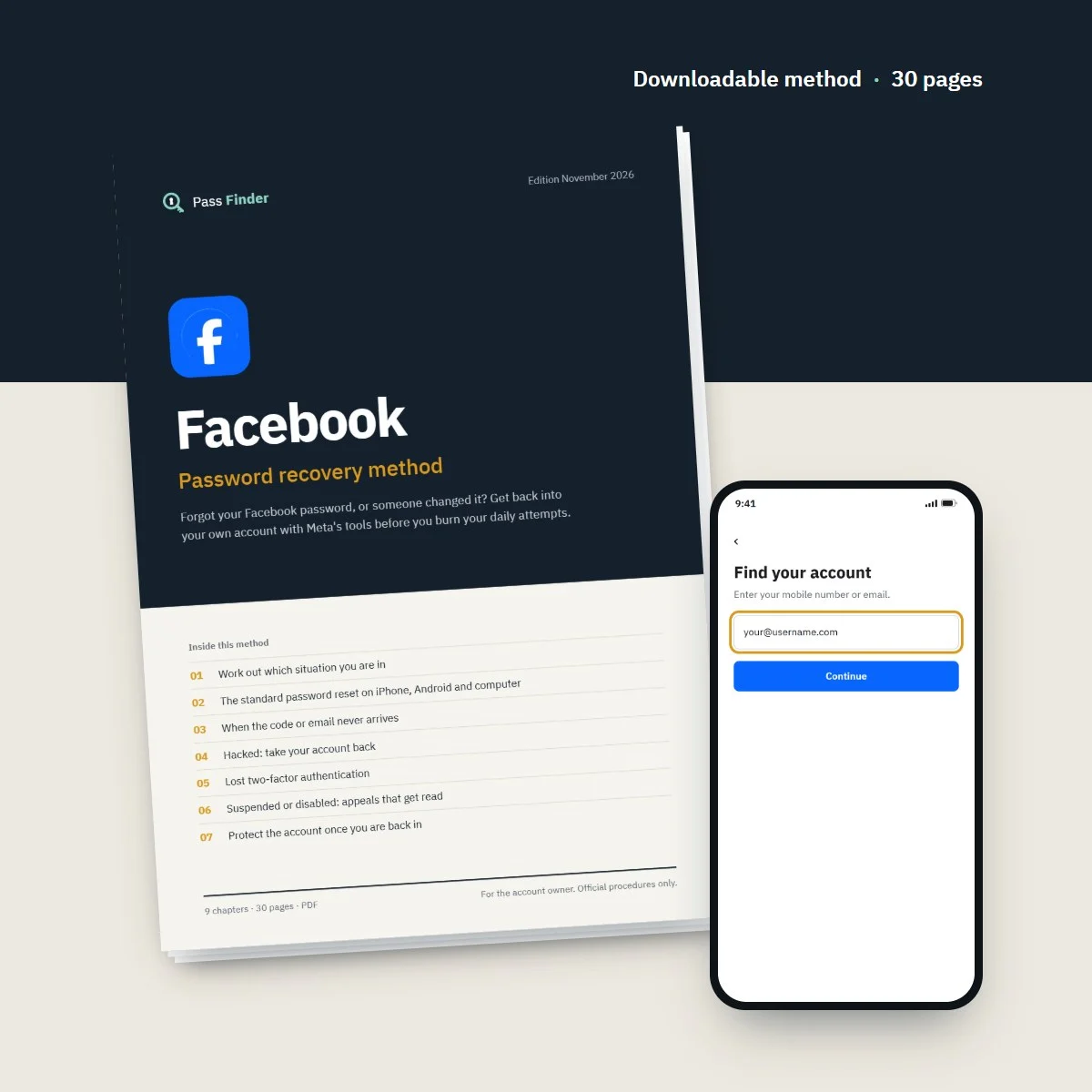

Facebook Password Recovery Method
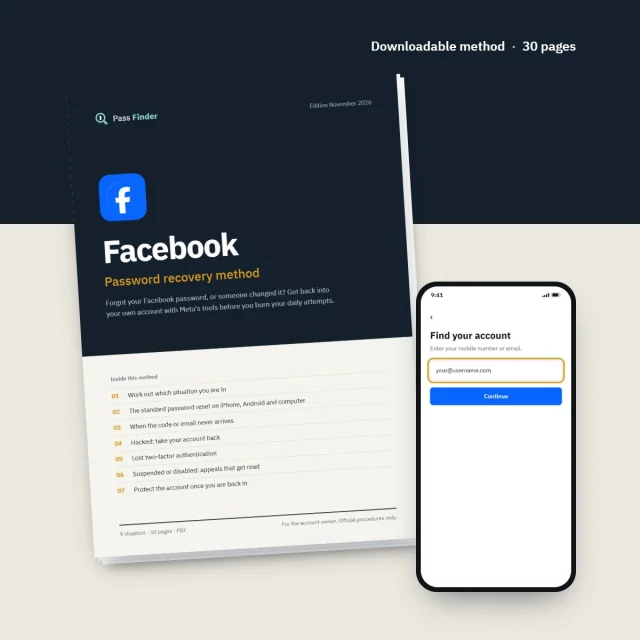
Forgot your Facebook password, or someone changed it? Get back into your own account with Meta's tools before you burn your daily attempts.
- Password reset by email or SMS on iPhone, Android and computer
- Hacked: reverse the email change and use facebook.com/hacked
- ID and video selfie checks done right the first time
- 7 ready-to-send messages for appeals, support and your friends
- Instant download
- Secure card payment
- 14-day refund if it does not fit your case
For the account owner only. Every method uses the platform’s official tools.
- Format
- PDF document (A4), opens on phone, tablet and computer
- Language
- English
- Delivery
- Download link right after payment, also sent by email
- Updates
- Free updated versions for 12 months
Which situation are you in?
Each case has its own route. The method covers all of them, with the exact screens and the messages to send.
I forgot my password
Reset with "Forgot password?" by email or SMS, on each device, without hitting the daily limit. Chapter 2 of the method.
The reset code or email never arrives
Spam folders, masked addresses, carrier filters and the one-day wait after too many requests. Chapter 3.
Hacked, email or phone changed
The reversal link sent to your old email, facebook.com/hacked and the identity check, before a new password. Chapter 4.
I lost my two-factor method
Recovery codes, approval from another device and the identity request on the code screen. Chapter 5.
My account is suspended
The 180-day appeal from the login screen, what to write and realistic delays. Chapter 6.
Facebook can't find my account
Old emails, country codes, your username and a friend's help. Chapters 1 and 9 of the method cover the last resorts.
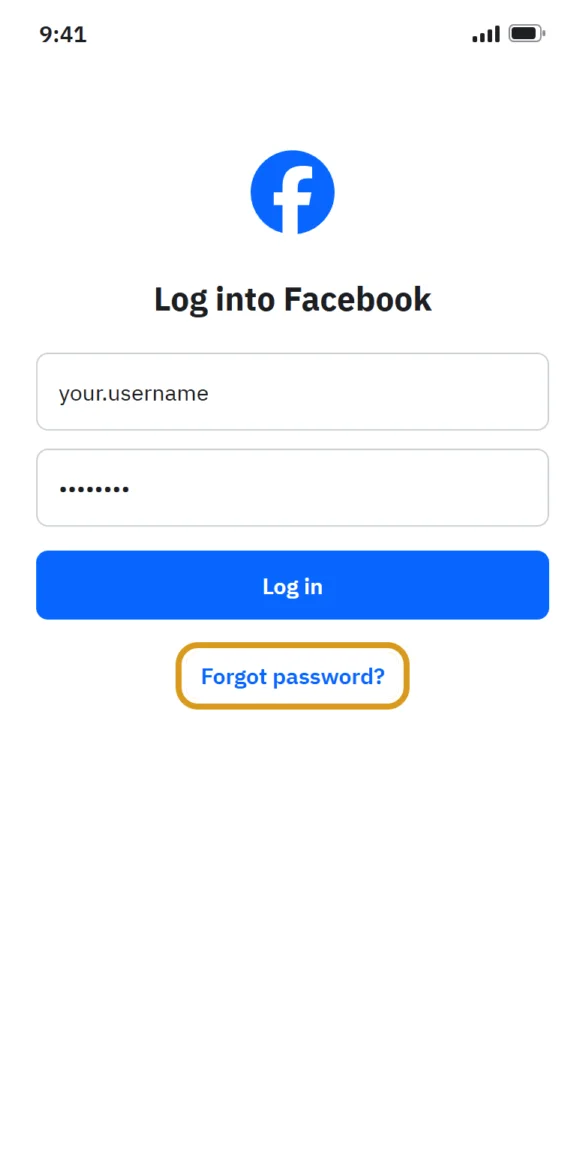
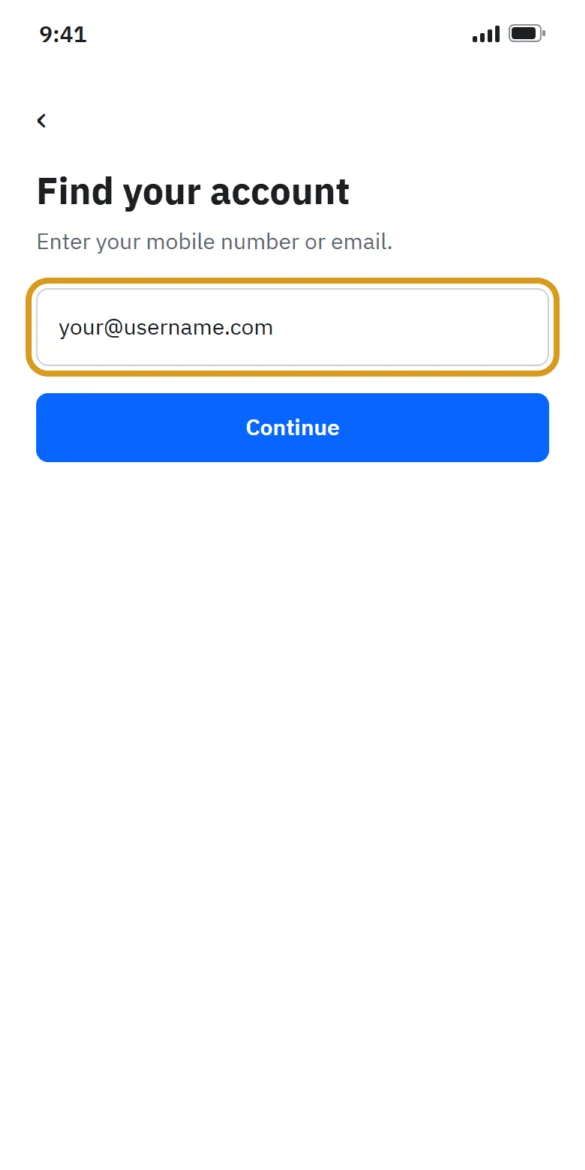
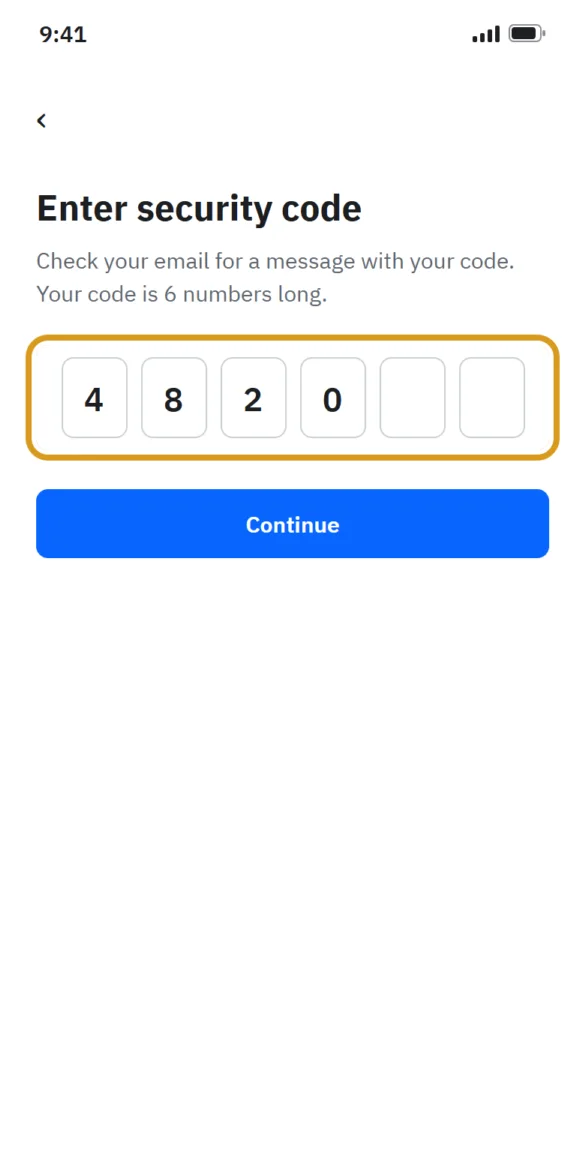
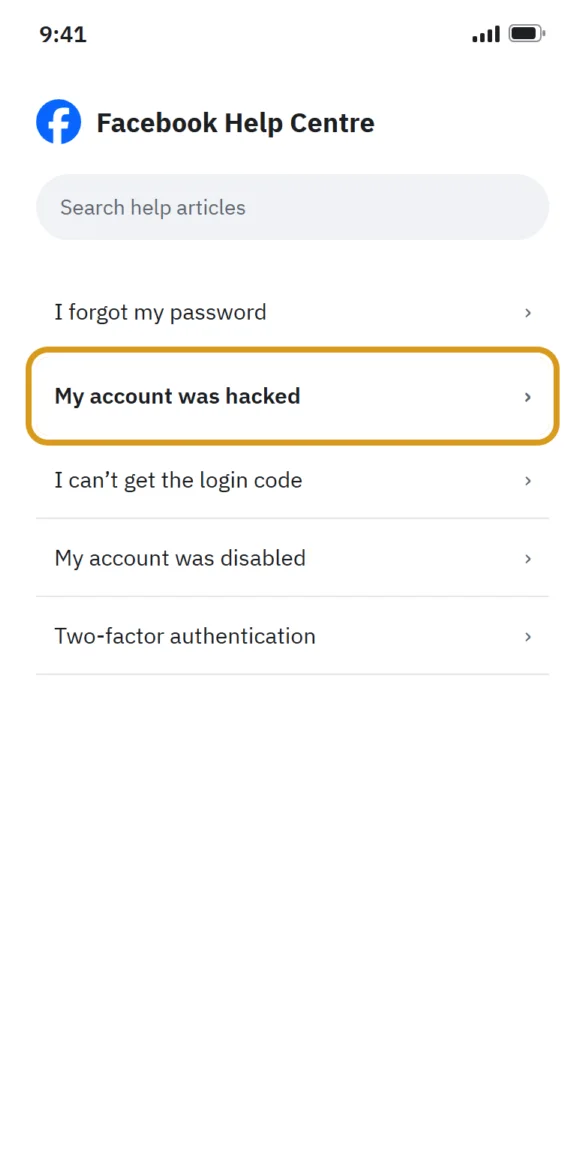
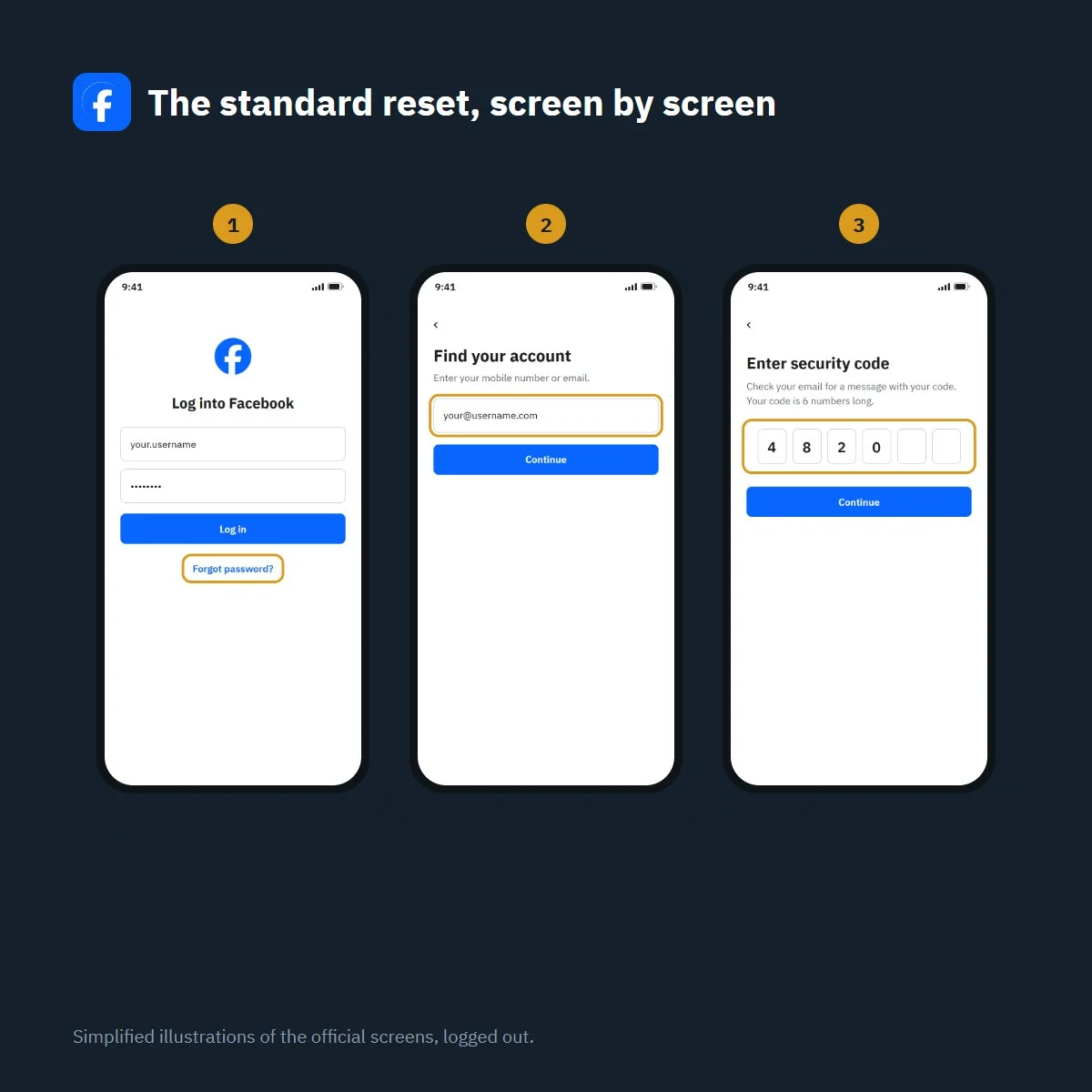
Recover your Facebook password in four steps
Simplified illustration of the official screens, logged out. Labels may vary slightly with app version.
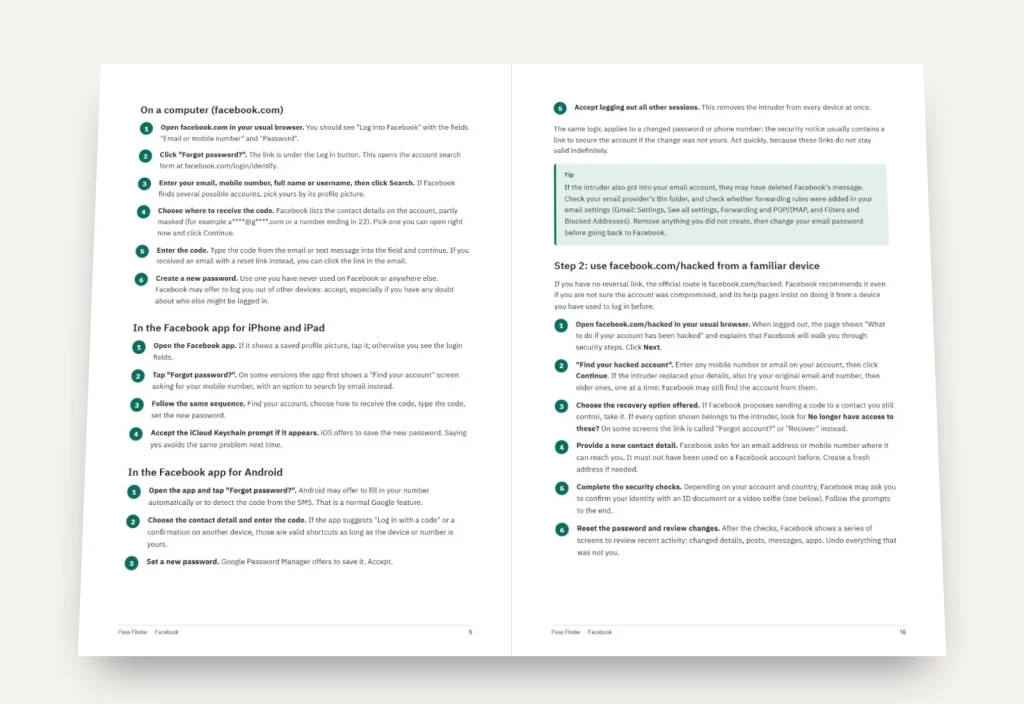
What’s inside the method
9 chapters, 30 pages. Each chapter ends with a checklist so you know where you stand.
-
01
p. 4
Work out which situation you are in
Read the exact message on your screen, list what you still control and pick the right route before trying anything.
-
02
p. 8
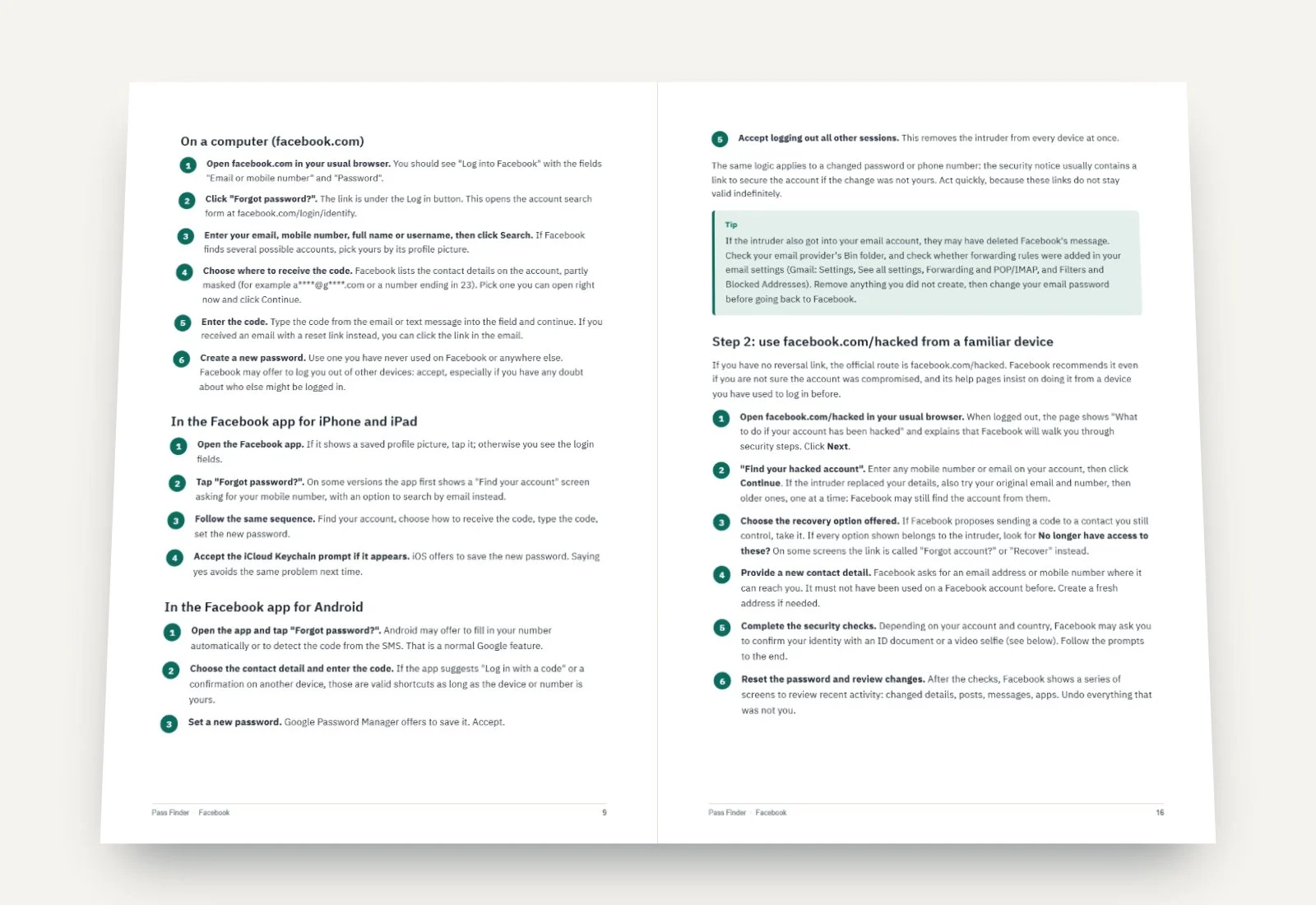
The standard password reset on iPhone, Android and computer
"Forgot password?", the account search and the code, step by step, with the two rules that block most resets.
-
03
p. 12
When the code or email never arrives
Mail folders, masked addresses, carrier filters, lost inboxes and the one-day wait after too many requests.
-
04
p. 15
Hacked: take your account back
The reversal link, facebook.com/hacked, ID and video selfie checks, security locks and a full clean-up.
-
05
p. 20
Lost two-factor authentication
Delayed SMS, approval from another device, recovery codes, authenticator backups and the identity request.
-
06
p. 22
Suspended or disabled: appeals that get read
The 180-day window, how to appeal from the login screen, two appeal templates and realistic delays.
-
07
p. 24
Protect the account once you are back in
Password manager, passkey, authenticator app, recovery codes, login alerts and sessions in fifteen minutes.
-
08
p. 26
Scams that target locked-out users
Fake recovery experts, fake Meta warnings, fake support numbers and the "code sent by mistake" trick.
-
09
p. 28
If nothing worked
A last checklist, how long to keep trying, and how to start a new account and warn your friends.
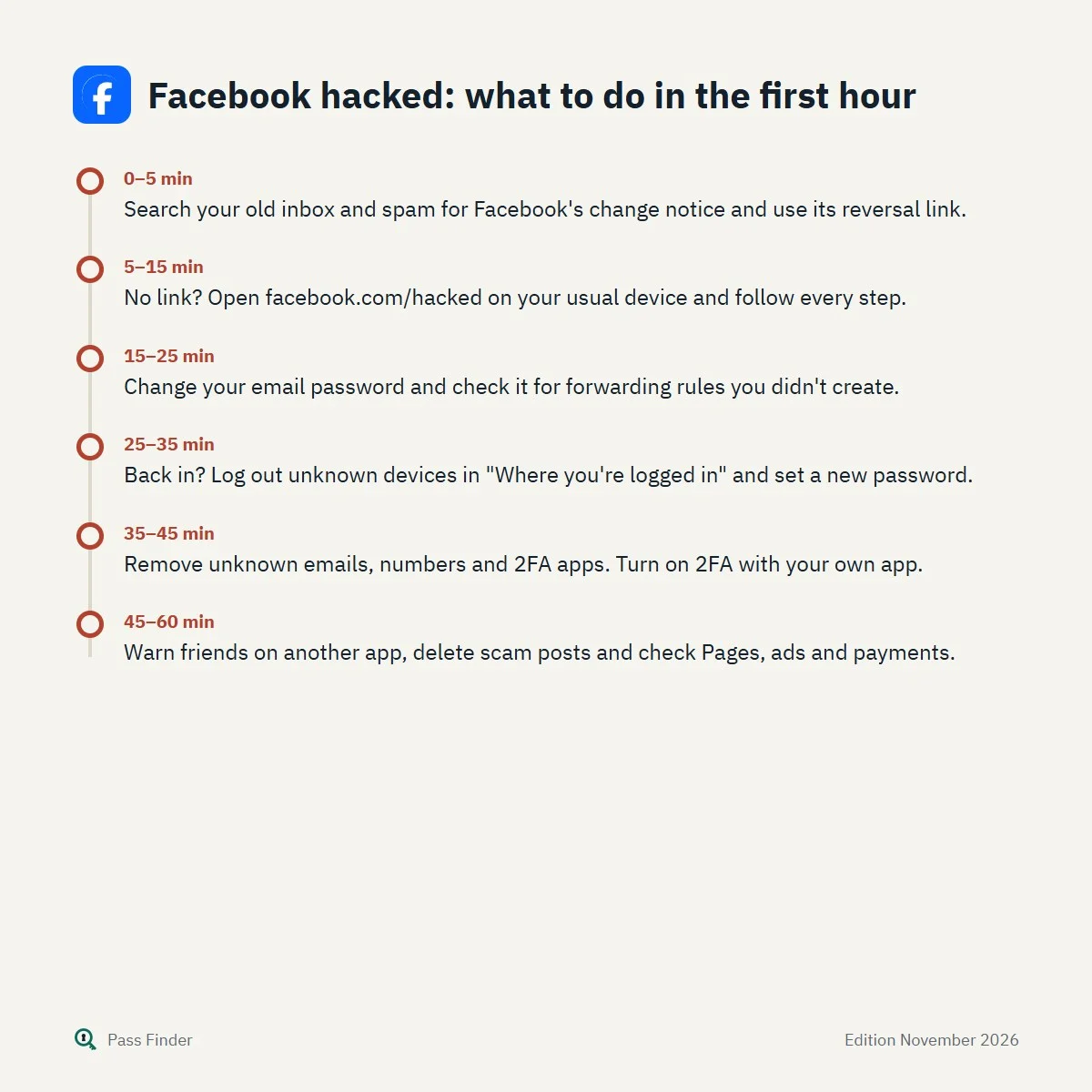
Facebook hacked: what to do in the first hour
- 0–5 minSearch your old inbox and spam for Facebook's change notice and use its reversal link.
- 5–15 minNo link? Open facebook.com/hacked on your usual device and follow every step.
- 15–25 minChange your email password and check it for forwarding rules you didn't create.
- 25–35 minBack in? Log out unknown devices in "Where you're logged in" and set a new password.
- 35–45 minRemove unknown emails, numbers and 2FA apps. Turn on 2FA with your own app.
- 45–60 minWarn friends on another app, delete scam posts and check Pages, ads and payments.
When you can’t access your Facebook account, more than a profile is at stake: years of photos, Messenger conversations, the groups you run, a business Page or the ad account behind it. The first instinct is to hit “Forgot password?” again and again. Often that is the right tool used the wrong way: the code goes to an old address, the daily limit kicks in, or, on a hacked account, the reset points to an email the intruder has just added.
You can usually recover your Facebook password and your account with Meta’s own tools, as long as you use them in the right order. This page explains, for free, how Facebook’s recovery actually works in November 2026, which route fits your case, and why the usual fixes fail, so you get back in without burning your daily attempts or answering a fake “support” message. It is written for people trying to get back into their own account, using only Facebook’s official tools.
Can’t access your Facebook account? Identify your situation first
Facebook has a different recovery path for each problem, and choosing the wrong one wastes attempts. Try to log in once on the phone or computer you normally use, then read the message carefully.
- “The password you’ve entered is incorrect” and you are unsure of the password: a forgotten password. The standard reset below is your route.
- You request a code and nothing arrives: a delivery problem, a wrong contact detail or a rate limit.
- An email told you your email address, phone number or password was changed, and it wasn’t you: the account has been taken over. Go to facebook.com/hacked and check your old inbox first.
- Your password works but Facebook asks for a login code you can’t get: lost two-factor authentication.
- “We suspended your account” or “We disabled your account”: an enforcement decision. Only an appeal applies.
- “Your account has been locked” with a Get started button: Facebook locked it for security after unusual activity, and walks you through the steps when you log in.
Two more cases are worth knowing. A deactivated account comes back as soon as you log in. A deleted account can be restored by logging in during the grace period, generally 30 days; after that, it is gone for good, and no method or service can bring it back.
Recover your Facebook password: the free official reset
If you can still open the email inbox or receive texts on a number linked to the account, the official reset takes about five minutes.
- Open facebook.com or the Facebook app and select Forgot password? under the Log in button.
- Enter the email address, mobile number, full name or username associated with the account, then select Search. You can also go straight to facebook.com/login/identify.
- Choose where to receive the code. Facebook shows partly masked contact details; pick one you can open right now.
- Enter the code, then set a new password you have never used elsewhere. Accept the offer to log out of other devices.
Two rules from Facebook’s own help pages explain many failures. First, you can only reset your password a certain number of times a day, so requesting five codes in a row can block you until the next day. Second, if two-factor authentication is on, you cannot use the same mobile number for both two-factor authentication and the password reset; the reset must then go through an email address or another number (How to change or reset your Facebook password).
Still logged in on an old phone, a tablet or a work computer? Change the password from there instead: Settings & privacy, Settings, Accounts Center, Password and security, Change password. It is the quickest recovery there is, and people often forget they have a session open somewhere.
Use a device Facebook recognises
Almost every Facebook recovery article gives the same advice: start from a device you have used to log in before. Facebook gives a familiar phone, computer and browser more options and fewer obstacles. Use your usual browser on your usual connection, without a VPN, rather than a friend’s phone or a private window.
Why the code or email never arrives
When the reset email or SMS does not show up, the cause is usually on your side of the line rather than Facebook’s. Check, in this order:
- Every mail folder. Facebook security emails come from addresses ending in facebookmail.com and often land in Spam, Promotions, Social or Other.
- The masked address. Look at the visible letters. If the address shown is not one you recognise, someone else may have added it, and the code will go to them.
- Your phone. You need mobile signal (not only Wi-Fi), space for new messages, and no spam filter blocking short-code messages. Some low-cost or prepaid plans block them; your carrier can enable them.
- The rate limit. Facebook’s advice is to wait a day before trying again if you have already requested several codes. Every request during the block simply fails.
- The format. Try your number with the country code (+44, +1) and every email address you have ever owned, one at a time.
If the email account itself is closed or lost, recover it first with your email provider. If it is gone for good, Facebook’s route for people without access to their email or phone is described on this Help Center page: after finding the account, select No longer have access to these? and provide a new email address or number that has never been used on a Facebook account.
Hacked account and the email changed: what to do first
When an intruder changes your email or phone number, the standard reset sends codes to them. Two official tools are designed for exactly this.
The reversal link. According to Facebook, when the email on an account is changed, it sends a message to the previous email address with a special link to reverse the change and secure the account. Search your old inbox, including spam, for that message. It is the fastest way back, and the intruder cannot stop it from reaching you. If they also got into your email, check its Bin and forwarding rules, and change that password first.
facebook.com/hacked. Open facebook.com/hacked on a device you have used before. The page “What to do if your account has been hacked” leads to “Find your hacked account”, where you enter any mobile number or email that is or was on the account. Facebook then walks you through security steps, which may include confirming your identity with an ID or, in some countries, a short video selfie compared with the photos on your profile (Recover your Facebook account if you were hacked).
As soon as you post about a hacked account, “recovery experts” will contact you, and pages list fake “Facebook support” phone numbers. They are scams. Facebook never asks for your password or a code by message, and nobody outside Meta can restore an account for a fee. Anyone asking you to forward a code “sent by mistake” is trying to take your account.

What you still have decides the method
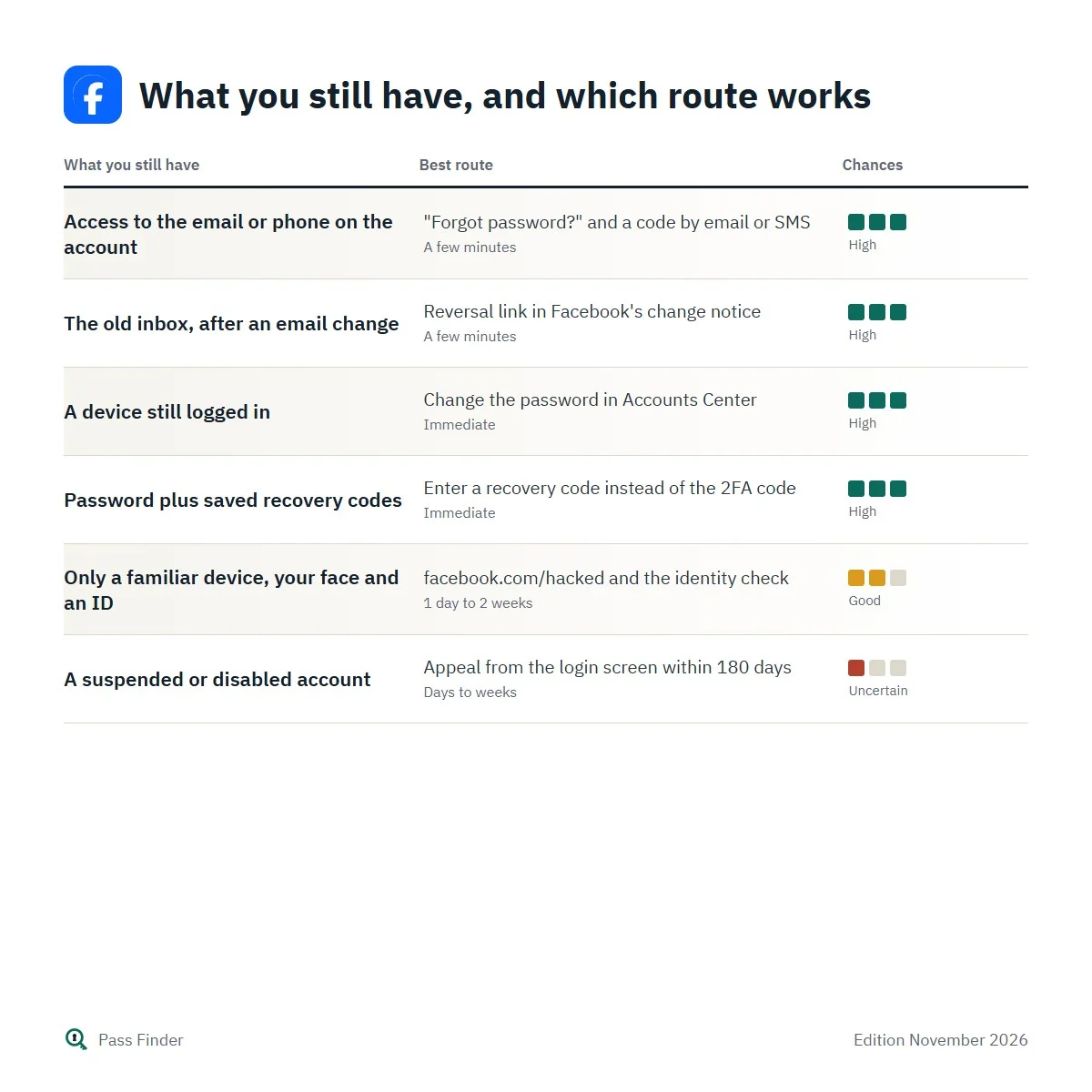
Facebook recovery is less about what you know than about what you still control: an inbox, a SIM, a logged-in device, saved recovery codes, your face and an ID. The table below links each situation to the route that usually works and the typical delay.
What you still have, and which route works
| What you still have | Best route | Typical delay | Chances |
|---|---|---|---|
| Access to the email or phone on the account | "Forgot password?" and a code by email or SMS | A few minutes | High |
| The old inbox, after an email change | Reversal link in Facebook's change notice | A few minutes | High |
| A device still logged in | Change the password in Accounts Center | Immediate | High |
| Password plus saved recovery codes | Enter a recovery code instead of the 2FA code | Immediate | High |
| Only a familiar device, your face and an ID | facebook.com/hacked and the identity check | 1 day to 2 weeks | Good |
| A suspended or disabled account | Appeal from the login screen within 180 days | Days to weeks | Uncertain |
One point surprises many people: old contact details are worth trying. Facebook’s own tips ask you to enter each email address and mobile number you have ever owned, one at a time, because an old one may still be attached to the account without you remembering it. Before concluding that you have “nothing left”, list every address and number you have owned since you created the account, including a former work address or a number from a previous carrier, and try each of them from your usual device.
The free steps on this page cover the common cases. Our Facebook password recovery method goes through every situation in detail, with the exact labels on iPhone, Android and computer, the ID rules that avoid rejections, seven message templates for appeals, friends and support, and real cases showing what worked.
Lost two-factor authentication
If your password is right but you can’t produce the login code, try, in order: wait a few minutes for a delayed SMS; approve the login from another device where you are still logged in; enter one of the 10 recovery codes Facebook offers with two-factor authentication (each works once). Browsers you saved with “Save this browser” don’t ask for a code, so your home computer may still let you in.
If none of that works, Facebook has an identity request built into the code screen. On a computer, click Need another way to authenticate?, then Other Options, then Get more help; on Android or the mobile website, tap Having trouble?; on iPhone or iPad, tap Need help?. Facebook states that you usually receive instructions within 1 to 2 business days (Troubleshoot login with two-factor authentication). This process is not available in Facebook Lite.
A note on “trusted contacts”: some websites still describe asking friends for recovery codes. Facebook’s feature was reported discontinued in 2022, and we could not confirm that it works today.
Suspended or disabled accounts
A suspension is a decision, not a login fault, so resets will not help. Facebook says you can appeal a suspension within 180 days by logging in, where you will be prompted to appeal; the window can vary by region. If you don’t appeal in time or the appeal fails, the account is permanently disabled. For severe violations, Facebook may disable an account without suspending it first (What to do if your personal Facebook account is suspended or disabled).
Write a short, factual appeal: who you are, why the decision seems wrong, and, if you were hacked, when and how. Long or angry texts don’t help. Delays range from a day to several weeks, and Facebook does not commit to a timeframe.
Identity checks: get them right the first time
Many recoveries end with an ID upload, and many uploads are rejected for avoidable reasons. Facebook accepts one government ID (passport, driving licence, national identity card, birth certificate) or two non-government documents such as a student card or library card. The document must show your name with your date of birth or photo, and the name should match the profile. Facebook rejects images that are blurry, poorly lit, photos of a screenshot or photocopy, or not fully in frame, and it refuses images digitally edited to hide details; you may cover the document number physically instead. Send only what is requested, as extra documents can slow the review (Confirm your identity).
What the method adds to Facebook’s help pages
The free steps above solve the simple cases. Facebook’s Help Center is accurate, but it is spread over dozens of articles, and it rarely says which one applies when the password reset has already failed. When the simple cases fail, details decide the outcome: which link appears on which device, how to word an appeal, how long to wait before trying again, what to do when the intruder turned on two-factor authentication with their own app, and how to start over without exposing your friends to the same scammers. The Pass Finder method puts all of this in nine chapters, from the first reset to the final checklist, with seven ready-to-send messages and a fifteen-minute security routine (new password, passkey, authenticator app, recovery codes) so this doesn’t happen again. Each step is checked against Facebook’s official help pages and its logged-out screens, and reviewed when Meta changes its procedure.
If you still can’t access your Facebook account after one careful reset, stop requesting codes. Download the Facebook password recovery method, read the message on your screen against Chapter 1, and follow the route it points to, in order.
Questions about this method
Other methods
Pass Finder is an independent publisher. We are not affiliated with, endorsed by or sponsored by Meta Platforms, Snap Inc., TikTok or X Corp. Platform names and logos belong to their owners and only identify the service each method is about.